
What are Events in ONE RACEHUB?
-
Events in ONE RACEHUB represent the race weekends, test days, or other occasions where your team participates.
-
Your racing data in ONE RACEHUB is organized in four levels. Each level sits inside the level above it.
The four levels of your ONE RACEHUB racing calendar
.png?width=670&height=558&name=figure-1-hierarchy%20(1).png)
⚠ Contestants are not a fifth level. A contestant is a car entry in a season. For details, see the Contestants article.
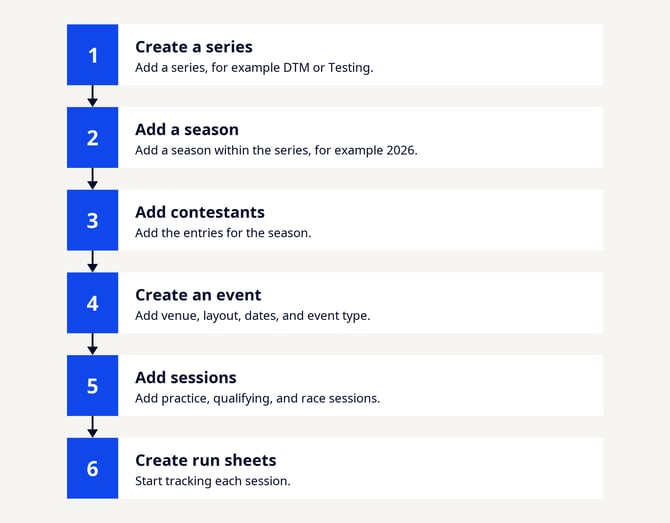
Set up your structure
Create each level before the levels below it. For example, you need a season before you can add its events and contestants.
⚠ Each series, season, event, session, and contestant has a unique ID used to identify records in the ONE RACEHUB. If an API request requires a specific record, use its ID copied from ONE RACEHUB rather than its displayed name.
Key benefits
Setting up your event structure correctly provides several advantages:
-
Organized Data: All information is logically structured and easy to find.
-
Automated Timing: Session names can match timekeeper data for automatic synchronization with ONE TIMING.
-
Calendar Integration: Events appear in your team calendar.
-
Historical Reference: Easily access data from previous events and seasons.
What's next?
-
Create Series
-
Create Seasons
-
Create Events