
What is Stream Health?
Stream Health provides a real-time overview of all driver radio streams during a live session. It helps you detect connection issues, silent feeds, and configuration problems before they affect transcription.
When to use Stream Health?
During a live session — monitor failures or silent feeds that may cause transcription gaps
When troubleshooting — quickly identify affected drivers and determine whether the issue is upstream (e.g. team radio off) or within ONE TRANSCRIPT
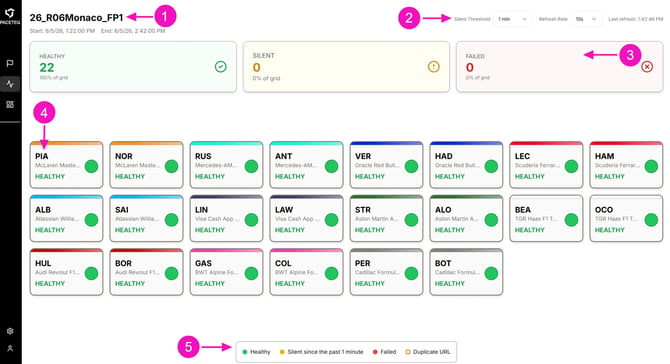
When a session is live, the Stream Health page is divided into five key areas:
-
Session header — The session name, start time, and end time
-
Controls — Silent Threshold, Refresh Rate, and last refresh timestamp
-
Summary cards — Number of Healthy, Silent, and Failed drivers
-
Driver grid — One card per driver showing team color, name, and status
-
Legend — A color key at the bottom of the page explaining each status
Understand Your Stream Health Indicators
Each driver has a primary status based on its stream connection and audio feed. Status is shown as a colored indicator on the driver card and reflected in the summary counts at the top of the page.
Each color indicates whether a stream is receiving audio, has gone silent, or is not working.
Stream status indicators:
Healthy (Green) - The stream is active. ONE TRANSCRIPT is receiving and transcribing audio. No action required.
Silent (Yellow) - The stream is active, but no audio has been detected for longer than the Silent Threshold (default: 1 minute). This may indicate that the audio source is quiet, muted, or misconfigured.
ⓘ Silent status does not always indicate an issue. Drivers may be inactive during certain parts of a session.
Failed (Red) - The stream is not connected or not delivering audio. Common causes include:
- No stream URL configured for the driver
- The stream processor has crashed or cannot connect
- The stream URL is invalid or unreachable
Duplicate URL (Orange Ring) - Multiple drivers are using the same audio feed, which may result in incorrect transcription attribution.
⚠ Ensure each driver has a unique stream URL in Settings → Drivers to avoid misattribution.
See also: