
What is a run?
-
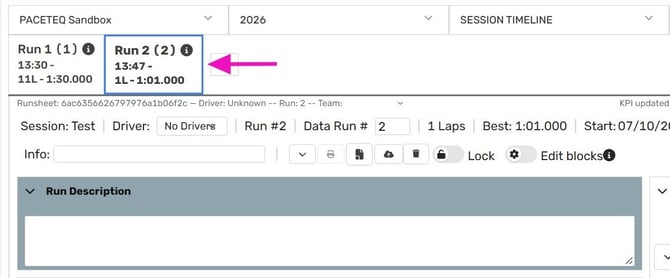
In ONE RACEHUB, a run is the smallest unit to which event data is assigned.
-
This includes data entered manually, setup data and data received from the car data service.
-
Each run can contain multiple laps, which are stored as part of that run.
Why runs matter
Runs provide a common reference for organizing and accessing event data.
- Finding data — Lap times, setup data, comments, tire data and car data are associated with the run they belong to.
- Matching incoming data — ONE RACEHUB assigns incoming lap times and car data to runs. Incorrectly configured runs can prevent this data from being matched correctly.
- Managing editing rights — Each run is assigned to a team, which determines who can edit it.
- Contacting Support — Every Run Sheet has a unique ID. You can share this ID with our Support Team to identify a specific run.
What is the Run Sheet?
-
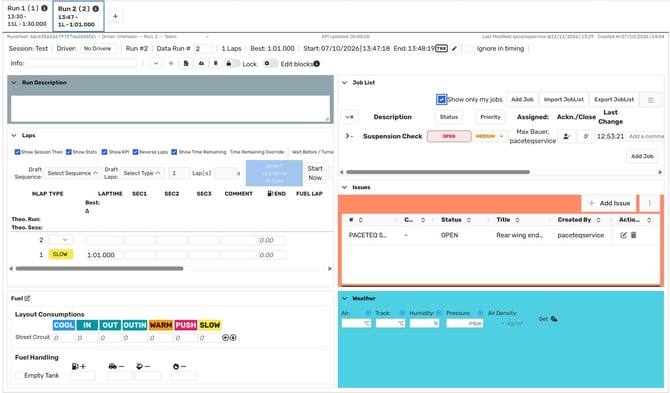
The Run Sheet is where you record and review the information associated with a run.
-
A Run Sheet Layout determines how information is displayed on the Run Sheet. It controls which data blocks appear, how they are arranged and which available fields they display.
ⓘ The underlying run data remains unchanged regardless of the layout. This allows different engineers to use different layouts while working with the same run data.
You can create layouts for different cars, event formats, or team workflows.
For instructions on creating and customizing layouts, see Run Sheet Layouts.
Runs, teams and editing rights
Each run is assigned to a team. This assignment determines which users can edit the run.
⚠️ When a team member creates a run, ONE RACEHUB automatically assigns it to their team.
- Users who belong to other teams can view the run but cannot edit it.
- Admins can edit runs regardless of their team assignment.
What's next?
Read the following articles in order. Each one builds on the previous.